Stop
The Stop activity terminates the workflow execution immediately.
Purpose
Use the Stop activity to:
- End workflow execution at a specific point
- Terminate workflows that reach a timeout condition
- Cancel workflows when certain conditions are met
- Cleanly exit workflows without errors
Configuration
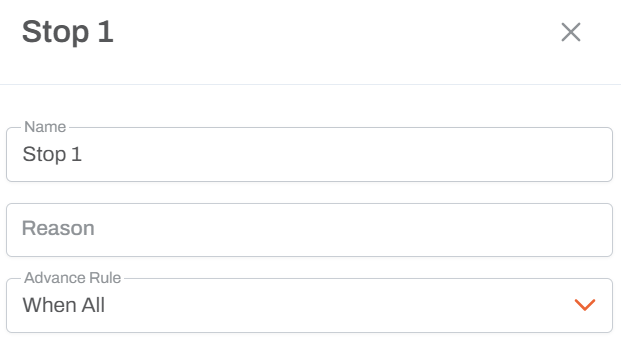
Name
- Activity Name: Unique identifier for this stop activity in the workflow
- Used to reference the activity in workflow design and execution logs
- Helps identify different stop points when you have multiple stop activities
Reason
- Text Field: Describes why the workflow was stopped
- Purpose: Documents the termination reason for audit and debugging
- Logging: The reason is recorded in the workflow execution log
- Visibility: Can be reviewed in the workflow history and logs
- Supports single-line or short text descriptions
Advance Rule
Determines when this activity is triggered based on predecessor activities:
- When All: Activity executes only after all predecessor activities complete (default)
- When Any: Activity executes when any predecessor activity completes
- When First: Activity executes the first time any predecessor completes, then ignores others
Example Reasons
- "Data load not completed within timeout period"
- "Approval rejected - workflow cancelled"
- "No more clients to process"
- "Invalid parameters provided"
- "User did not complete action within 24 hours"
- "No data available for processing"
Behavior
- Immediate Termination: All workflow execution stops when this activity is reached
- No Error State: The workflow ends normally, not as a failure
- Logging: Stop reason is logged for audit purposes
- Active Tasks: Any active tasks in other branches are cancelled
Usage Patterns
Timeout with Delay
┌─── User Action
│
├─── Delay (12 hours) ───┐
│                        ├─── Stop (Reason: "No data load within timeout")
└────────────────────────┘
Conditional Stop
If condition ──[No]──> Stop (Reason: "Condition not met")
            │
           [Yes]
            │
        Continue...
End of Loop
Get Next Item ──> If (no more items) ──> Stop (Reason: "All items processed")
                            │
                          [Yes]
                            │
                      Process Item ──> Loop back
Usage Notes
- Use descriptive reasons to make workflow logs clear
- Stop is not an error - it's a normal termination
- Helps prevent accumulation of incomplete workflow instances
- Essential for timeout patterns in scheduled workflows
- Can be used at the end of conditional branches that should not continue
Comparison to Workflow Completion
- Stop: Manually terminates execution at a specific point
- Natural Completion: Workflow reaches the end with no more activities
- Both result in completed workflow status
- Stop provides explicit reason logging
Best Practices
- Always provide a clear, meaningful reason
- Use Stop to handle edge cases and timeout scenarios
- Include context in the reason (e.g., date, parameter values)
- Review stop reasons regularly to identify workflow issues