Note
The Note activity allows you to add documentation and comments to your workflow diagram.
Purpose
Use the Note activity to:
- Document workflow logic and decisions
- Add explanatory comments for workflow maintainers
- Provide context for complex workflow sections
- Create visual annotations in the workflow designer
Configuration
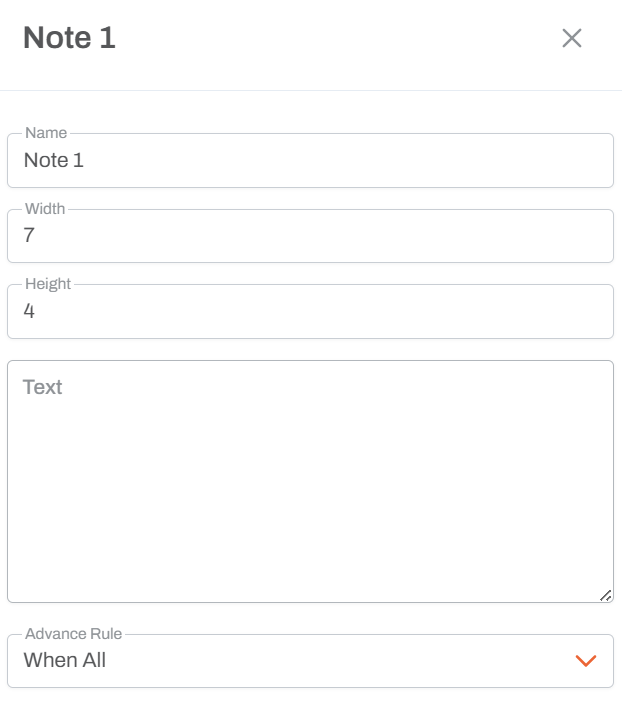
Name
- Activity Name: Unique identifier for this note in the workflow
- Used to reference the note in the workflow designer
- Helps identify different notes when you have multiple documentation sections
Width
- Numeric Value: Controls the horizontal size of the note box in the workflow designer
- Measured in grid units
- Default value: 4
- Larger values create wider note boxes
- Adjust to fit the amount of text content
Height
- Numeric Value: Controls the vertical size of the note box in the workflow designer
- Measured in grid units
- Default value: 2
- Larger values create taller note boxes
- Adjust based on the length of your documentation text
Text
- Large Text Area: Free-form text field for your documentation content
- Supports multi-line text
- No character limit
- Use to describe:
- Workflow logic and business rules
- Decision criteria
- Important considerations
- Instructions for workflow maintainers
- Integration points or dependencies
Advance Rule
Note: Since Note activities are non-executable and purely visual, the Advance Rule doesn't affect execution.
Behavior
- Non-Executable: The Note activity does not execute any logic
- Visual Only: Appears in the workflow designer for documentation purposes
- Connections: You can draw arrows to Note activities, but they don't affect execution flow. You can not draw arrows from Note activities to other activities.
- Size Adjustable: Use Width and Height to make notes fit your content and workflow layout
Usage Notes
- Purely for documentation and visual organization
- Does not impact workflow execution or performance
- Useful for onboarding new team members to complex workflows
- Can help explain business logic or decision points
- Size the note appropriately using Width and Height to match your content
- Use descriptive names to easily identify notes in complex workflows
Best Practices
- Clear Descriptions: Write concise, informative documentation text
- Strategic Placement: Position notes near the workflow sections they describe
- Appropriate Sizing: Adjust Width and Height to ensure text is readable without excessive whitespace
- Meaningful Names: Use descriptive note names when you have multiple notes
- Document Decisions: Explain why certain workflow paths or activities exist
- Update Regularly: Keep note content current as workflows evolve
- Avoid Over-Documentation: Use notes for important information, not every detail