Delay
The Delay activity pauses workflow execution for a specified amount of time.
Purpose
Use the Delay activity to:
- Wait for a specific duration before continuing
- Implement timeout mechanisms
- Create polling intervals
- Add time-based controls to workflow execution
Configuration
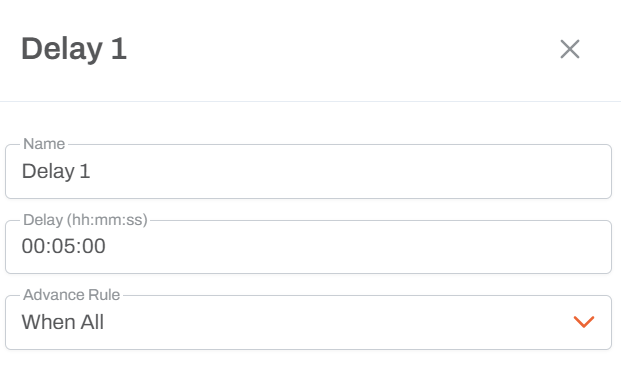
Duration Settings
- Specify the delay duration in minutes or seconds
- The workflow will pause at this activity for the specified time
Common Use Cases
Timeout Pattern
Create a race condition between user action and timeout:
┌─── Data Load Activity───┐
│                         ├─── Stop
└─── Delay (12 hours) ────┘
How it works:
- Data Load and Delay execute in parallel
- Whichever completes first triggers the Stop activity
- If no one uploads data within 12 hours, the workflow stops
- Prevents accumulation of pending tasks in scheduled workflows
Polling Interval
Check for a condition repeatedly:
Check Status ─── Delay (5 minutes) ─── Loop back
Sequential Delays
Implement multi-stage waiting:
Send Notification ─── Delay (1 hour) ─── Send Reminder
Usage Notes
- Execution pauses at the Delay activity until the time elapses
- Other parallel workflow paths continue executing normally
- The delay is wall-clock time, not processing time
- Useful in combination with parallel branches for timeout scenarios
- If the workflow is stopped manually, the delay is cancelled
Best Practices
- Use delays sparingly as they keep workflow instances active
- Consider whether a scheduled workflow restart might be better than long delays
- For very long delays (days/weeks), evaluate if the workflow should complete and reschedule
- Common timeout values: 12-24 hours for daily processes, 5-15 minutes for polling
Timeout Pattern Details
When combined with scheduled workflows:
- Workflow starts at scheduled time (e.g., 10 AM daily)
- User has until timeout to complete action
- If timeout reached first, workflow stops cleanly
- Next day, workflow starts fresh without pending tasks
- Prevents accumulation of uncompleted instances