Script
The Script activity executes a C# expression using DynamicExpresso, a sandboxed interpreter. It is the primary way to compute values, read or write workflow context variables, and perform data transformations that standard activities do not cover.
Purpose
Use the Script activity to:
- Read and write workflow context variables
- Perform calculations or data transformations
- Execute custom logic that doesn't require conditional branching
- Derive intermediate values for use in subsequent activities
Configuration
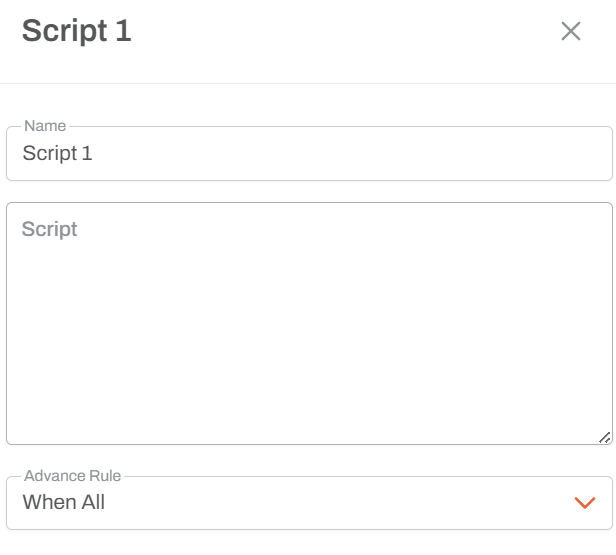
Code Expression
Write a single C# expression. The expression is evaluated at runtime inside a sandboxed interpreter. It does not have access to the full .NET runtime — only the types and variables listed below.
Single Exit Path
Script has only one outcome path. Execution always continues to the next connected activity unless the script throws an unhandled exception (see Error Behaviour).
The Context Dictionary
At runtime the script receives a variable called Context, which is the workflow's shared state dictionary (OrderedDictionary). All workflow variables live here.
| Syntax | Effect |
|---|---|
Context["key"] | Read a value |
Context["key"] = value | Write or update a value |
Context and context (lowercase) are both valid — they refer to the same object.
Pre-populated Keys
The following keys are available in every workflow run without any setup:
| Key | Type | Description |
|---|---|---|
RunName | string | Name of the current workflow run |
StartedBy | string | Username of the person who started the run |
StartedBy_FullName | string | Full display name of the person who started the run |
Tenant | string | Current tenant identifier |
StartTime | string | UTC start time of the run |
NoOfExecutedActivities | int | Count of activities executed so far |
Any parameters passed when launching the workflow and any global variables configured in the system are also injected before execution begins.
Variable Interpolation Syntax
In addition to Context["key"], the script field supports {VariableName} shorthand. Before the script is evaluated, every {VariableName} token is replaced with the current context value. This makes expressions shorter but is purely a substitution — it does not bypass the context dictionary.
// These two lines are equivalent:
Context["Total"] = (double)Context["Qty"] * (double)Context["Price"]
Context["Total"] = {Qty} * {Price}
Use Context["key"] = value for writes; {key} is convenient for reads in short expressions.
Available Types and Methods
The script runs inside a sandboxed interpreter. Only the following types are available:
| Type | Notes |
|---|---|
string | All instance methods, string.Format, etc. |
int, long, double, bool | Primitive numeric and boolean types |
DateTime | DateTime.Now, DateTime.UtcNow, .Year, .Month, .AddDays(n), etc. |
Convert | Convert.ToInt32(), Convert.ToDouble(), Convert.ToString(), etc. |
Enumerable | LINQ extension methods: .Where(), .Select(), .Sum(), .First(), etc. |
JObject | Newtonsoft JSON object — useful for parsing JSON string values |
Lambda expressions are supported, so LINQ chains work:
Context["Total"] = Enumerable.Range(1, 5).Sum(x => x)
Types not available include Math, Regex, List<T>, Dictionary<K,V>, file/IO types, and all custom application types. If you need those, consider wrapping logic in a stored procedure or a custom activity.
Error Behaviour
If the script throws any exception at runtime, the activity:
- Logs the exception message to the workflow run log
- Returns an Error status, stopping the workflow
Always test scripts with realistic context values. A common mistake is reading a key that has not been set yet — this returns null and causes a null-reference or cast error downstream.
Examples
Read and write a context value
Context["Year"] = DateTime.Now.Year
Derive a value from two existing context variables
Context["Total"] = (double)Context["Qty"] * (double)Context["Price"]
Using interpolation shorthand:
Context["Total"] = {Qty} * {Price}
Copy and rename a context key
Context["Year"] = Context["FinancialYearParameter"]
String concatenation
Context["FullName"] = (string)Context["FirstName"] + " " + (string)Context["LastName"]
Date extraction
Context["CurrentYear"] = DateTime.Now.Year
Context["CurrentMonth"] = DateTime.Now.Month
Parse a JSON context value
Context["City"] = JObject.Parse((string)Context["AddressJson"])["city"].ToString()
LINQ over a range
Context["SumOf10"] = Enumerable.Range(1, 10).Sum(x => x)
Usage Notes
- Not for regular users — requires C# knowledge and familiarity with the context dictionary pattern.
- Sandboxed — only the types listed above are available. This is intentional; the interpreter does not execute arbitrary .NET code.
- Single expression — the script is evaluated as a single expression. Multi-statement blocks (e.g.
if/else,forloops) are not supported. Use chained ternary operators or LINQ for conditional logic. - Type casting — context values are stored as
object. Cast explicitly when passing to typed operations:(double)Context["Amount"]. - Case-sensitive keys —
Context["Year"]andContext["year"]are different entries.
JSON Reference
{
  "discriminator": "ScriptWorkflowActivity",
  "activityId": "<uuid>",
  "name": "Script",
  "positionX": 0,
  "positionY": 0,
  "advanceRule": 2,
  "script": "Context[\"Year\"] = DateTime.Now.Year"
}
| Property | Type | Description |
|---|---|---|
script | string | Corresponds to the Code Expression field. A C# expression evaluated by the DynamicExpresso interpreter. Has access to Context (the workflow context dictionary), DateTime, Convert, Enumerable, JObject, and primitive types. Supports {variable} interpolation before evaluation. |