Lock Subprocess
The Lock Subprocess activity provides mutual exclusion for activities that must not run in parallel, even across different workflow instances.
Purpose
Use the Lock Subprocess when you need to:
- Prevent concurrent execution of critical operations
- Serialize access to shared resources
- Protect stored procedures that can't run simultaneously
- Ensure data consistency when multiple workflow paths might conflict
How It Works
Locking Mechanism
- Lock Name: Identifies the lock (e.g., "DataLoadProcess")
- Mutual Exclusion: Only one lock subprocess with the same lock name can execute at a time
- Queue: Other instances wait until the lock is released
- Timeout: Maximum time to hold the lock (up to 300 seconds)
Scope
- Tenant-Wide: Locks apply across all workflows in the tenant
- Cross-Workflow: Different workflows using the same lock name will serialize
- Instance-Wide: Multiple instances of the same workflow respect the lock
Configuration
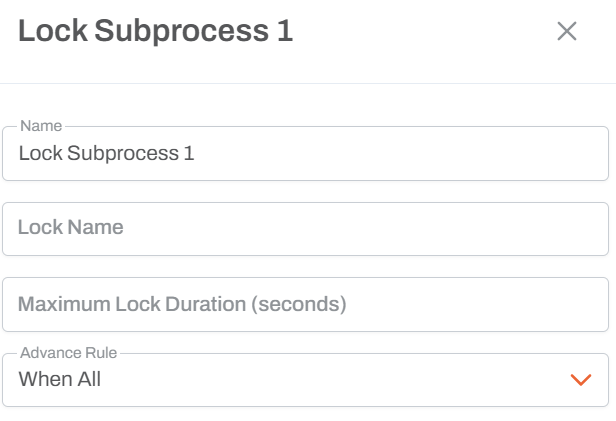
Lock Settings
- Lock Name: String identifier for the lock (any name you choose)
- Maximum Duration: Up to 300 seconds (5 minutes)
Example Configuration
Lock Name: "ModelCalculationLock"
Maximum Duration: 300 seconds
Common Use Cases
Protecting Stored Procedures
Lock Subprocess: "ModelCalculation"
  └─ Stored Procedure: Calculate Model
Why: Stored procedure uses temporary tables that conflict if run in parallel
Shared Resource Access
Lock Subprocess: "StagingTableAccess"
  ├─ Clear Staging Table
  ├─ Load New Data
  └─ Process Staging Data
Why: Multiple instances shouldn't manipulate the staging table simultaneously
Model Loading
Lock Subprocess: "ETLProcess"
  └─ ETL: Load from Staging to Model
Why: ETL processes that modify the model should run sequentially
Execution Behavior
First Instance (Acquires Lock)
- Reaches Lock Subprocess
- Acquires lock immediately
- Executes internal activities
- Releases lock when complete
Second Instance (Waits)
- Reaches Lock Subprocess with same lock name
- Waits until first instance releases lock
- Acquires lock when available
- Executes internal activities
- Releases lock when complete
Race Condition
- From your perspective, it's random which instance gets the lock first
- Internally, it's the first to request the lock
- Both instances will complete, but sequentially
Example Scenario
Multiple Parallel Paths
Path A: Lock Subprocess "ETL" ──> Stored Procedure
Path B: Lock Subprocess "ETL" ──> Stored Procedure
Execution:
- Both paths execute in parallel
- Path A reaches lock first, acquires it
- Path B reaches lock, must wait
- Path A completes stored procedure, releases lock
- Path B now acquires lock and executes
- Path B completes and releases lock
Usage Notes
- Timeout: If maximum duration is reached, the lock is forcibly released
- Performance: Locking can slow workflow execution - use judiciously
- Deadlocks: Be careful with multiple different locks to avoid deadlock scenarios
- Same Lock Name: Ensure all instances that need serialization use exactly the same lock name
- Case Sensitive: Lock names are case-sensitive
Historical Use Case
At a previous implementation (Fluence):
- Model calculation engine used temporary tables
- Running two instances simultaneously caused data corruption
- One stored procedure would write to temp tables while another deleted from them
- Lock Subprocess ensured only one calculation ran at a time
When to Use Lock Subprocess
Use When:
- Stored procedures use temporary tables or shared state
- Operations must be atomic across the entire subprocess
- Multiple workflow instances might conflict
- Data integrity requires sequential execution
Don't Use When:
- Activities are naturally independent
- Performance is critical and operations are safe to parallelize
- You can redesign to avoid shared state
Best Practices
- Descriptive Names: Use lock names that describe what's being protected
- Minimal Scope: Lock only the activities that truly need serialization
- Timeout Planning: Set timeout slightly longer than expected execution time
- Documentation: Document why the lock is necessary
- Testing: Test with multiple concurrent workflow instances
Comparison to Regular Subprocess
| Feature | Subprocess | Lock Subprocess |
|---|---|---|
| Grouping | Yes | Yes |
| Mutual Exclusion | No | Yes |
| Cross-Workflow | N/A | Yes |
| Timeout Setting | No | Yes |
| Performance Impact | Minimal | Can add wait time |
JSON Reference
{
  "discriminator": "LockWorkflowActivity",
  "activityId": "<uuid>",
  "name": "Lock Subprocess",
  "positionX": 0,
  "positionY": 0,
  "advanceRule": 2,
  "lock": "ModelCalculationLock",
  "maxLockSeconds": 300,
  "workflow": {
    "settings": {},
    "activities": [
      {
        "discriminator": "StartWorkflowActivity",
        "activityId": "<new-uuid>",
        "name": "Start",
        "positionX": 0,
        "positionY": 0,
        "advanceRule": 2,
        "preventMultipleActiveRuns": true,
        "dueDateCalculationMode": 0,
        "parameters": []
      }
    ],
    "arrows": []
  }
}
| Property | Type | Description |
|---|---|---|
lock | string | Corresponds to the Lock Name field. The string identifier for the semaphore lock. Only one subprocess with this lock name can execute at a time across all workflows in the tenant. |
maxLockSeconds | integer | null | Corresponds to the Maximum Duration field. Maximum time in seconds the lock can be held before it is forcibly released. |
workflow | object | The embedded sub-workflow definition. Must contain its own StartWorkflowActivity. |