Data Input
The Data Input activity allows users to enter or update data as part of the workflow process.
Purpose
Use the Data Input activity when you need users to:
- Enter data into dashboards
- Update application information
- Provide data that the workflow needs to continue
Configuration
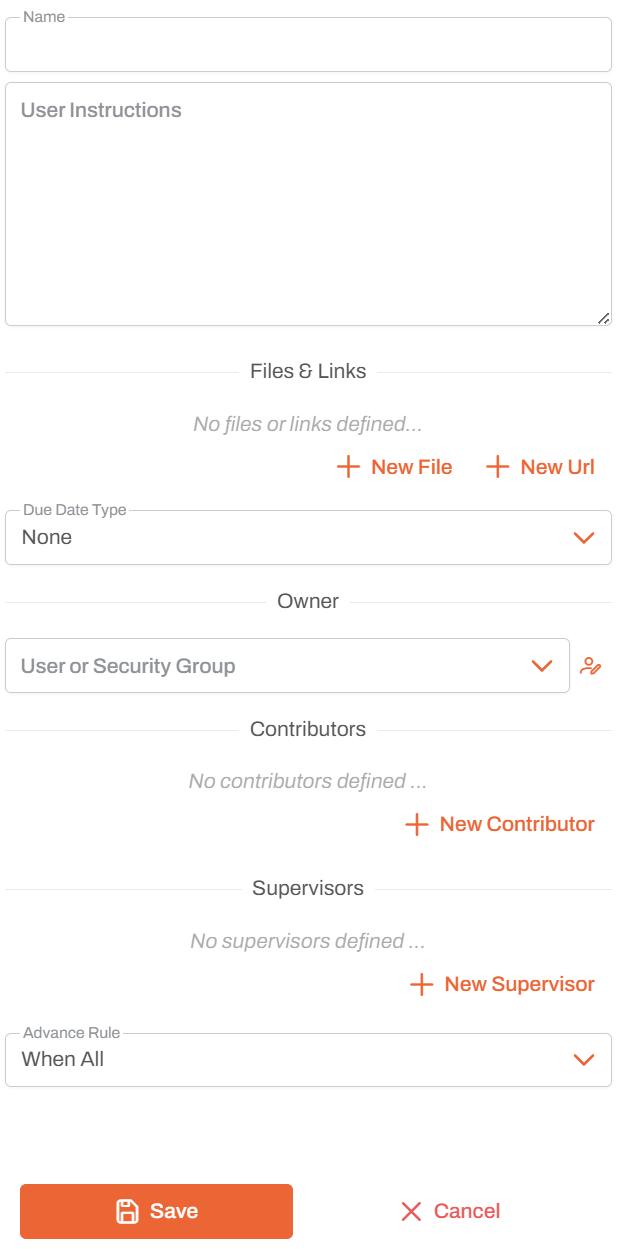
Name
- Activity Name: Unique identifier for this data input in the workflow
- Used to reference the activity in workflow design and execution logs
User Instructions
- Instructions Field: Large text area for detailed instructions
- Provide clear, step-by-step guidance for the assigned user
- Supports multi-line text for comprehensive task descriptions
Files & Links
Add supporting materials to help users complete the data input:
- New File: Attach files from the application for reference
- New Url: Add links to external resources, documents, or systems
- Files and links appear in the data input view for easy access
Due Date Type
Configure when the data input should be completed:
- None: No deadline specified
- Fixed Date: Set a specific due date
- Relative: Set deadline relative to workflow start or previous activity
Owner
- User or Security Group: Assign the data input to a specific user or group
- The owner is responsible for making sure the data has been entered correctly
- Only one owner can be assigned per data input
- Click the icon to browse and select from available users and groups
Contributors
- Add Multiple Contributors: Users who can assist with the data input
- Contributors can view and work on the task alongside the owner
- Click + New Contributor to add users or groups
- Useful for collaborative data entry tasks
Supervisors
- Add Multiple Supervisors: Users who oversee the data input
- Supervisors can monitor progress and completion
- Click + New Supervisor to add users or groups
Advance Rule
Determines when this activity is triggered based on predecessor activities:
- When All: Activity starts only after all predecessor activities complete (default)
- When Any: Activity starts when any predecessor activity completes
- When First: Activity starts the first time any predecessor completes, then ignores others
Usage Notes
- Built on the Action activity
- Intended for scenarios where users actively input data rather than just reviewing
- Currently implemented identically to Report, but semantically indicates data entry intent
- The distinction from Report is conceptual: Report is read-only, Data Input expects user contributions
- Can be used to capture data that will be used later in the workflow
- Use clear, actionable instructions to ensure accurate data entry
- Attach relevant files and links to provide context
Best Practices
- Clear Instructions: Write detailed, step-by-step instructions in the User Instructions field
- Appropriate Assignment: Assign to users who have the knowledge and access to provide the data
- Include Context: Add files and links that provide necessary background information
- Set Deadlines: Use Due Date Type when timely data entry is important
- Use Contributors: Add contributors for data entry that benefits from collaboration
- Add Supervisors: Include supervisors when oversight or data validation tracking is needed