Data Maps
A Data Map translates the values found in a staging table into members of one dimension. Where the source carries a GL string, a code or a label that is not the member name, the map says which member each value stands for, so an Import Definition can load the rows without the source data being changed first.
Data Maps live under Settings → Integrations → Data Maps. Each map belongs to one dimension, shown in the list next to its name. Maps tagged Managed by integration were created by a connection and are read-only here.
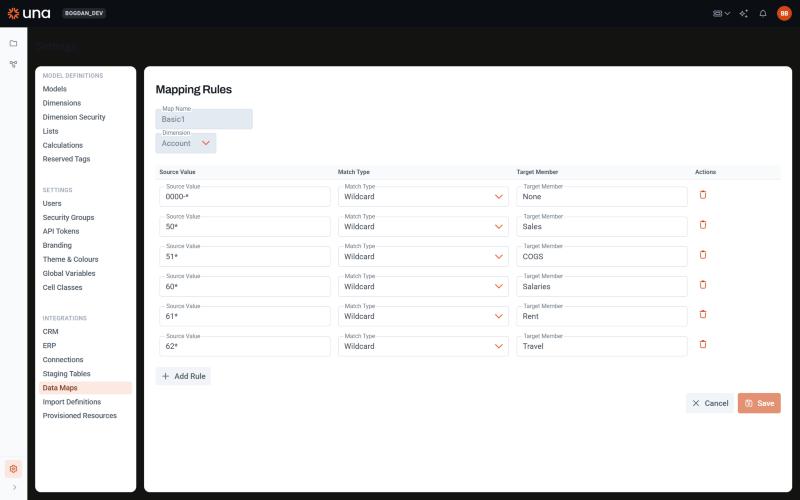
Creating a Data Map
Click Add New, then:
- Give the map a name: letters, digits, spaces, hyphens and underscores. The name is what you pick in the Import Definition's Data Map column.
- Choose the dimension whose members the map produces.
- Add rules. Each rule has a Match Type, a Source Value and a Target Member; the target is the name of a member of the dimension.
Rules are read top to bottom and the first rule that matches wins. Matching is case-insensitive. Put specific rules first and general ones last, and end with a catch-all when every value must map somewhere.
Match types
| Match type | The rule matches when… | Source Value examples |
|---|---|---|
| Exact | The value equals the source value. | 4000 |
| Wildcard | The value fits a pattern in which * stands for any run of characters and ? for one character. | 4* matches 4000 and 4100-200; Dept ?? matches Dept 10 |
| In | The value is one of a comma-separated list. | 4100,4110,4120 |
| Range | The value lies between two bounds, inclusive, written as low-high. | 5000-5999 |
Two details of the matching worth knowing:
- Wildcard captures. Every
*in a wildcard pattern captures what it matched, and each*in the target member is replaced by the captures in order.Dept *→*mapsDept SalestoSales;*-*→Entity *mapsUS-100toEntity US. A target without*is used as it is. - Range compares text, not numbers, and splits the source value at its first hyphen.
5000-5999works because both bounds have the same length; a range such as900-1200does not behave as a numeric range, and the lower bound cannot itself contain a hyphen.
Example
An Account map for a GL export whose account column holds a four-digit account number:
| # | Match Type | Source Value | Target Member |
|---|---|---|---|
| 1 | Exact | 4000 | Product Revenue |
| 2 | In | 4100,4110,4120 | Service Revenue |
| 3 | Range | 5000-5999 | Cost of Sales |
| 4 | Wildcard | 6* | Operating Expenses |
| 5 | Wildcard | * | Unmapped |
4110 stops at rule 2, 6500 at rule 4, and anything else lands in Unmapped, a member created for the purpose so that the load never fails on an unknown account and the stray rows are easy to find.
What happens in a Data Load
For a dimension mapped with the Data Map mapping type, every staging value is run through the map:
- No rule matches — the row fails with
Value "…" for dimension … cannot be mapped. - A rule matches but its target is not a member — the row fails with
… maps to "…" which is not a valid member. - The target is a member — the row is loaded against that member.
Failed rows are logged and skipped; see Running a Data Load for how validation errors affect the run.
A map is also used by dimension updates when the target dimension is data-mapped: the source member's name is run through the map to find its counterpart in the target, and in Mapping only mode the update appends rules to the map for values that no rule matches. A dimension update that takes its members from staging values appends a rule as well, for every value no rule matches, pointing at the member created for that value. Rules appended either way are Exact rules at the end of the map; you can edit or reorder them afterwards.
Tips
- Keep one map per source vocabulary. If two files use different account codes, give them different maps rather than one map that tries to cover both.
- A catch-all
*rule as the last rule guarantees every value maps somewhere. It also means Mapping only dimension updates have nothing to append, since nothing is ever unmatched. - Member names change; when a target member is renamed in the dimension, update the rules that point to it.